CygNet Redundancy Concepts
This topic lists and describes the fundamental concepts underlying the CygNet Redundancy application.
See the following subsections below for more information:
Automatic Failover
Automatic failover within the CygNet Redundancy model assures that failed services will switch operation from an active domain to a standby (redundant) domain in the event the active RSM (and its owned services) becomes unavailable. Any RSM running on a domain configured in a local standby or a data-center standby role will constantly monitor the current status of the RSM on the primary active server. If the standby RSM detects that the RSM on the active domain is unavailable for whatever reason, a failover will be automatically triggered.
- Auto-failover trigger settings are configured on the Auto-failover page of the CygNet Redundancy Editor. The Failover triggers are then associated with a local standby and/or data-center standby domain on the Domains page. Also see Remote Recovery.
- Local automatic failover is configured via the Automatic Service Recovery option of the CygNet Redundancy Editor. Also see Local Recovery.
Bastion Host
A Bastion Host is a live CygNet host located outside the Redundancy environment, but the services on the bastion host are themselves not configured for redundancy. The purpose of the bastion host is to monitor the service and site health of the sites within the redundancy environment. The bastion host can also be configured to send notifications during a failover, and to host a common Audit service across redundant domains. The bastion host should not contain any production services.
A bastion host is an optional, but highly recommended configuration.
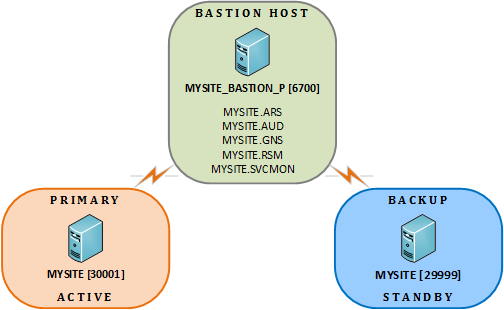 |
| Bastion Host Setup Example |
Required Services
The bastion host must have an ARS service:
- The bastion host must have one non-redundant ARS (often referred to as a bastion ARS) configured for each domain in the redundancy environment. The purpose of the bastion ARS is to make sure that clients can always connect to services on the domain, even during a failover.
Optional Services
The bastion host may have a SVCMON service:
- The SVCMON service is optional in the bastion host, but highly recommended. The non-redundant SVCMON service will collect data for every RSM running in each data center. Since the RSMs are running on all possible domains, the bastion host SVCMON service will just have to pick one domain on which to talk to each RSM.
Recommended Services
Best practice recommends an AUD, BSS, ELS, and GNS service configured on the bastion host. See Services on the Bastion Host for more information.
Firewall
If the bastion host is located on a server outside a firewall, the firewall must be configured to allow UDP traffic through the various service ports.
Control Network
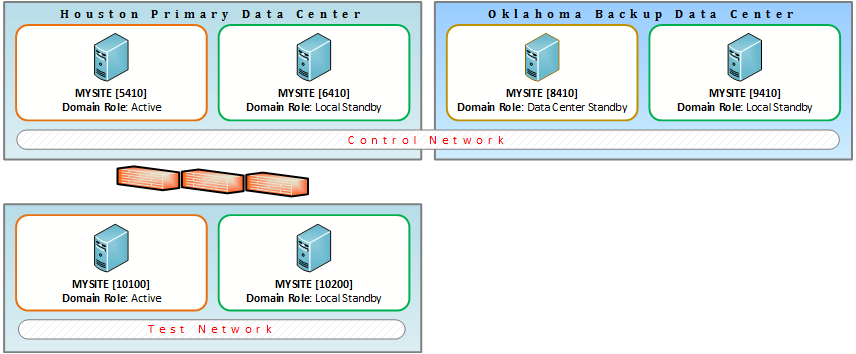
The Control Network is the network that contains the Live Domain, which is the primary domain in your redundancy environment doing the polling. The Control Network is configured as part of the redundancy definition on the Network page of the CygNet Redundancy Editor.
|
| Control Network Example |
Data Center
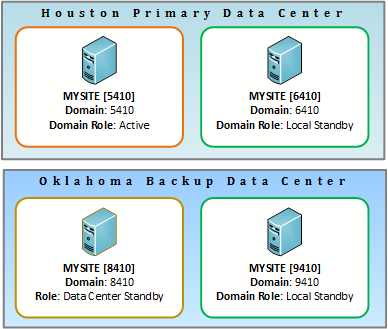
A Data Center is a group of networked servers typically used for the remote storage, processing, or distribution of large amounts of data. In the diagram above, two data centers are shown: Houston Primary Data Center and Oklahoma Backup Data Center. The Test Network could be in a different data center, or in one of the other two.
Disaster Recovery
Disaster Recovery is the act of recovering data due to a natural or man-made disaster to maintain business continuity. If the currently Active data center has incurred the disaster, a data-center failover may (will likely) be necessary.
Domain
Domain denotes the network port used by the ARS to communicate across the network. See Domains for more information.
Domain Role
The Domain Role specifies the purpose of the domain. Roles include:
- Active
- Local Standby
- Data-Center Standby
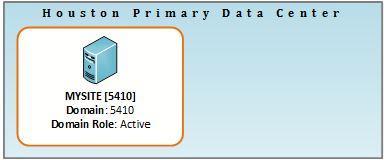
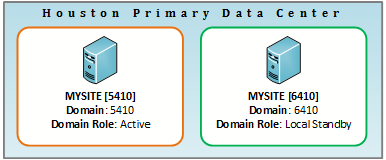
The domain role never changes. The Domain Role is configured as part of the redundancy definition on the Domain page of the CygNet Redundancy Editor.
|
| Single data center showing the Active server |
|
| Single data center showing the Active server and the Local Standby server |
|
| Two data centers showing the Active and Local Standby servers in the Primary data center and the Data-Center Standby and the Local Standby servers in the Backup data center |
Failover
Failover is the process of switching the domain on which the active server is running to a standby (or backup/redundant) server. Failover ensures seamless operation in the event of a planned or unplanned interruption in service. The purpose of a redundant environment is to support failover.
Failover can be manual or automatic. Manual failover requires user intervention to initiate and determine the failover process. Automatic failover occurs when a system is configured to automatically switch services from an active server to a standby server in the event of a total system compromise. See Automatic Failover.
High Availability Distributed (HAD) Failover
CygNet services are switched over from host machines in one data center to backup CygNet services running at a separate, geographically distant data center. Often described as Disaster Recover (DR) failover. See Remote Recovery.
High Availability Local (HAL) Failover
CygNet services are switched from host machines in a local data center to backup CygNet services running on another host machine in the same local data center. See Local Recovery.
Live Domain
The Live Domain is the single domain in your redundant environment responsible for collecting data. All data originates in this domain. The live domain lives within the Control Network and could run on any single host in a control network.
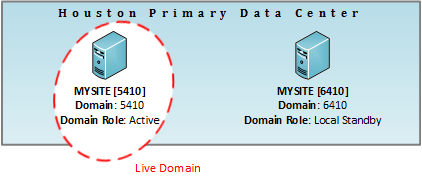
|
| Live Domain Example |
Local Recovery
An RSM in a redundancy environment is expected to restart and fix any failed local service. This is accomplished by configuring a Failover action in Automatic Service Recovery (either in the RSM for each service, or via a mass modification update in the CygNet Redundancy Editor.)
Redundancy Environment
The Redundancy Environment contains all CygNet servers, sites, and domains in a CygNet system that engage in a redundant relationship. The redundancy environment is configured in the CygNet Redundancy Editor.
Redundancy Editor
The CygNet Redundancy Editor is a configuration tool where you can define the relationships between the servers, hosts, and sites in your redundancy environment. The Redundancy Editor is also where you set up the trigger conditions that will initiate the auto-failover process for each domain in the redundancy environment. Once all redundant relationships are known by the system, you can execute failover between machines, stop and start sites, and allow servers to switch the domains on which they are running, and support high availability across data centers.
The editor can be invoked from the RSM in CygNet Explorer via a context menu, or added to a CygNet Studio screen. See CygNet Redundancy Editor.
Redundancy
Redundancy is a system architecture that provides for the duplication of critical services to meet the requirements of high availability. Replication and failover are activities that occur within a redundant system architecture ensuring data integrity is matched between a source and a destination.
Redundant Mode
Redundancy Mode describes the current redundancy state for a service. See REDUNDANT for more information. Options include:
- TRUE — indicates that the service is in a redundant relationship with another service within the redundancy environment.
- FALSE or commented out — indicates that Redundancy is disabled for the service.
The IN_REDUNDANT_SET info item returns the current redundancy state of the service.
Redundant Relationship
Two or more services connected in a duplicative way are considered to be in a Redundant Relationship. Relationships are configured in the CygNet Redundancy Editor and stored in redundancy definition tables for each participating RSM and synchronized to every RSM that is part of the relationship. Once an RSM has a redundancy definition, it can only be modified via the editor if it's running on the primary domain (as specified in the relationship definition).
The REDUNDANT keyword indicates whether redundancy is enabled for a service and if it is part of a redundant set with other services. The IN_REDUNDANT_SET info item returns whether the service is part of a redundant relationship.
If a service is part of a redundant relationship, it would be invalid to have replication configured at the same time as this value will be passed in from the RSM when needed. A service should not startup with this configuration.
The service will not start up if both redundancy and replication are enabled simultaneously.
Redundant Server Pairs
Redundant server pairs are two partner servers at one location (i.e. in a control room) configured to provide redundant SCADA server capability. See Domain Role above.
- Primary server — The server intended to host the Active Domain
- Backup server — The server intended to host the Standby Domain
- Active server — Server currently hosting the Active Domain
- Standby server — Server currently hosting the Standby Domain
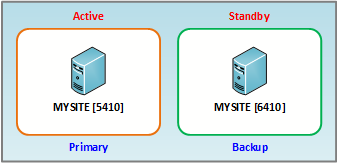
|
| Active/Standby Primary/Backup Pairs Example |
Remote Recovery
In a redundancy environment configured for automatic failover, any standby RSMs (local or data center) will monitor active RSMs for failure. If one or more active RSMs become unavailable (based on auto-failover triggers configured in the CygNet Redundancy Editor), the standby RSM will initiate a failover. A test mode is available to help verify the configured trigger settings. Remote recovery works with both local and data-center redundancy. When enabled, the standby RSM will have a Failover Status of Monitoring.
Remote Service Manager (RSM) Role
The Remote Service Manager (RSM) is the CygNet service that performs all the work related to CygNet Redundancy. Note the following:
- The RSM database stores the redundancy definition created for a redundancy environment. This includes a list of every service/domain combination and which RSM owns the combination. The database also synchronizes between all RSMs identified in the redundancy definition.
- A redundant RSM without any redundancy definitions, uses the same logic as a non-redundant RSM.
- For a Redundant RSM with a redundancy definition, the following occurs:
- The RSM starts on multiple domains, per the redundancy definition configured in the CygNet Redundancy Editor.
- The ambient domain, the domain configured in CygNet Host Manager, and the domain configured in service configuration file are all ignored.
- The RSM starts the services on the domain specified in its database.
Zone
The Zone represents the physical server(s) hosting a single instance of a CygNet site. In a CygNet redundancy environment a zone represents one or more servers running one or more redundant RSMs all operating on the same domain. A zone can be a single server, but it may also represent multiple servers running one or more sites that can be part of a redundant definition. Zones are configured as part of the redundancy definition on the Zone page of the CygNet Redundancy Editor.
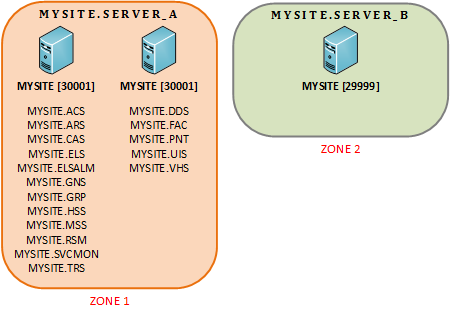
|
| Zone Example |


